
We’re inviting customers to test the latest release candidates for four of our geolocation plugins:
- Gravity Geolocation 3.5.0-rc6
- Formidable Geolocation 3.0.0-rc4
- Ninja Geolocation 3.5.0-rc4
- WP Job Manager Geolocation 3.0.0-rc4
These releases introduce the new WPGeo Dashboard, a central place in your WordPress dashboard for discovering, installing, activating, and managing our plugins built on the WPGeo Framework.
Gravity Geolocation has advanced to RC6 because it received additional Gravity Search and package improvements after the shared RC4 dashboard work. The other three plugins remain on RC4 because their release-candidate builds have not required further changes.
These are testing releases rather than final versions. We recommend using them on a staging or development website while we complete final testing and prepare the official releases.
The New WPGeo Dashboard
The WPGeo Dashboard brings plugin, license, and account information together inside the WordPress administration area.
You can connect it to your GEO my WP account to see the products and licenses available to you. Depending on your account, you can install an eligible plugin, activate it, or choose another available version for testing.
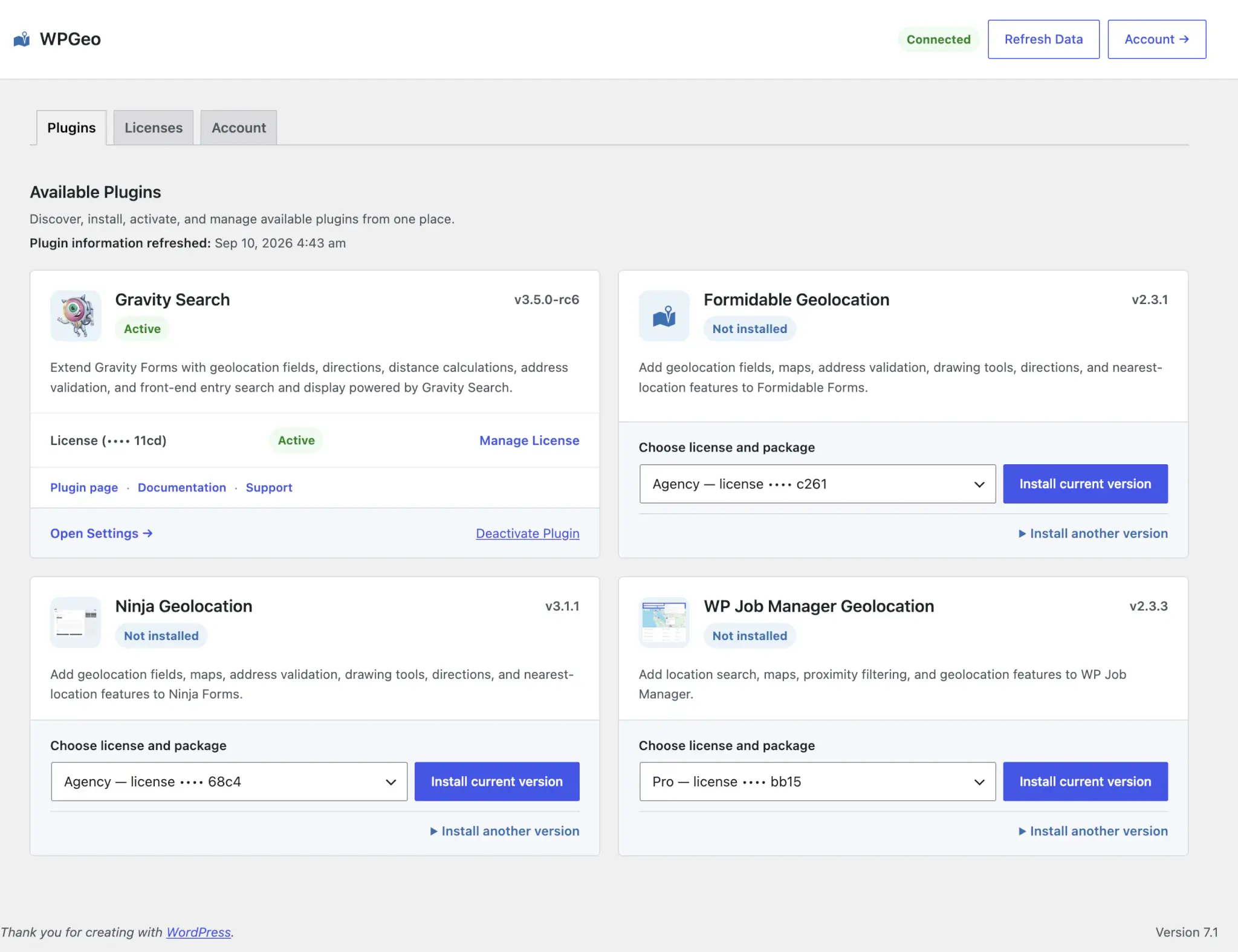
The dashboard is organized into three areas:
- Plugins shows your installed WPGeo-powered plugins and other products available through your account.
- Licenses shows your available licenses and whether they can be used on the current website.
- Account shows the connected GEO my WP account and useful connection information.
A WPGeo Dashboard link is also available from our WPGeo-powered plugin rows on the WordPress Plugins screen. The regular license settings inside each plugin remain available, so you can continue using the workflow you already know.
Installing Plugins Through the WPGeo Dashboard
Because the WPGeo Dashboard is included with these releases, you must first download an eligible release candidate from the Downloads section of your GEO my WP account and install it on your WordPress site.
After installing the release candidate and connecting your account, you can use the dashboard to install and manage your other eligible WPGeo plugins.
When you install a plugin through the dashboard, the latest stable version is selected by default. If another version is available to your account, you can expand Install another version, review the available versions, and choose the version you want to install.
Release candidates are never installed automatically. Installing one also does not move the plugin’s automatic updates to a prerelease channel, so future automatic updates will continue to use stable releases.
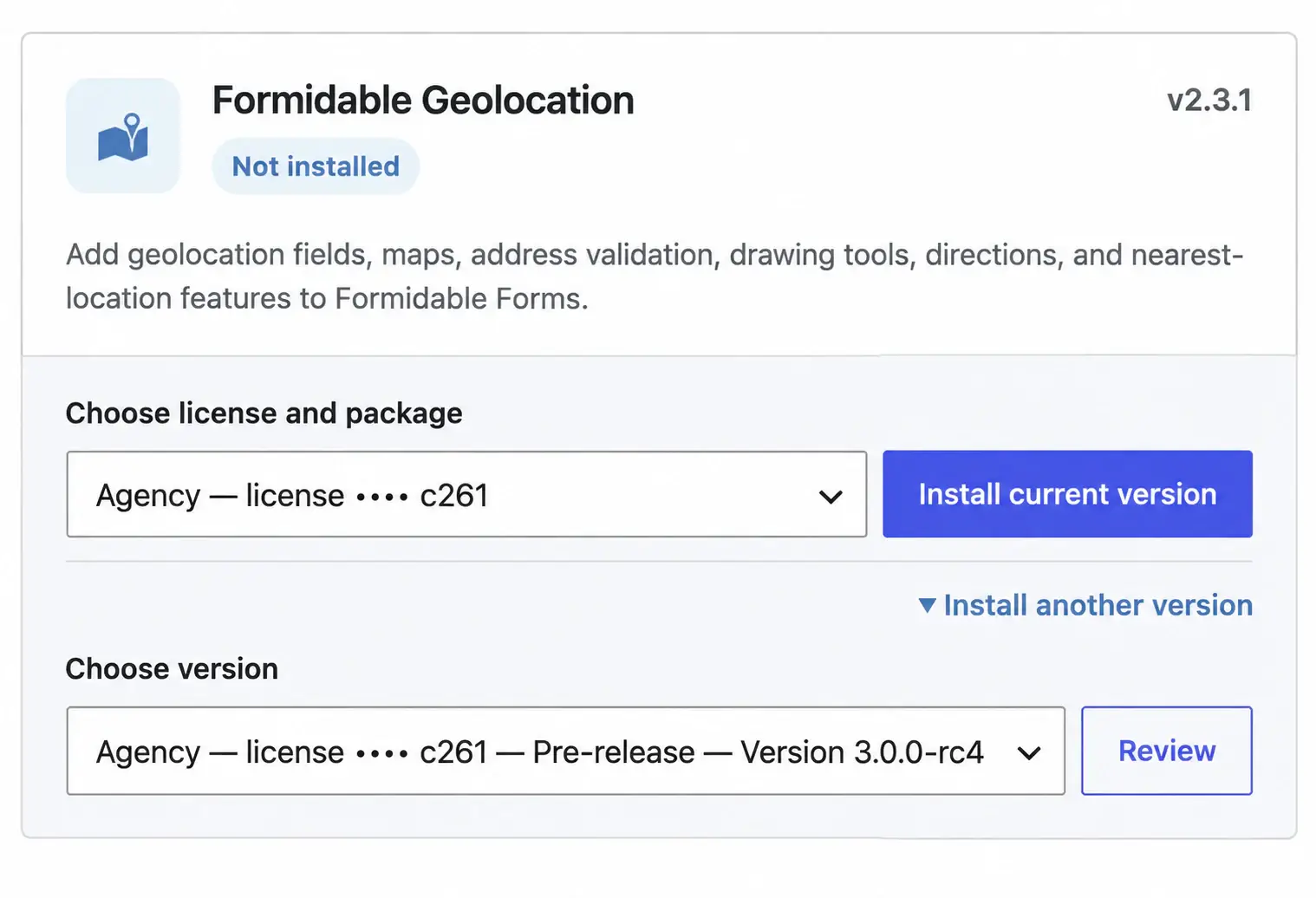
If you do not choose a release candidate, your website will continue using the normal stable release and update process.
Gravity Geolocation 3.5.0-rc6
Gravity Geolocation RC6 includes a substantial update to Gravity Search, our tool for turning Gravity Forms entries into searchable directories, listings, maps, and optional entry-details pages.
The Search setup experience is now easier to navigate and understand. Related settings are grouped more clearly, and a readiness summary appears throughout Search Settings to show what is in use and whether anything needs attention.
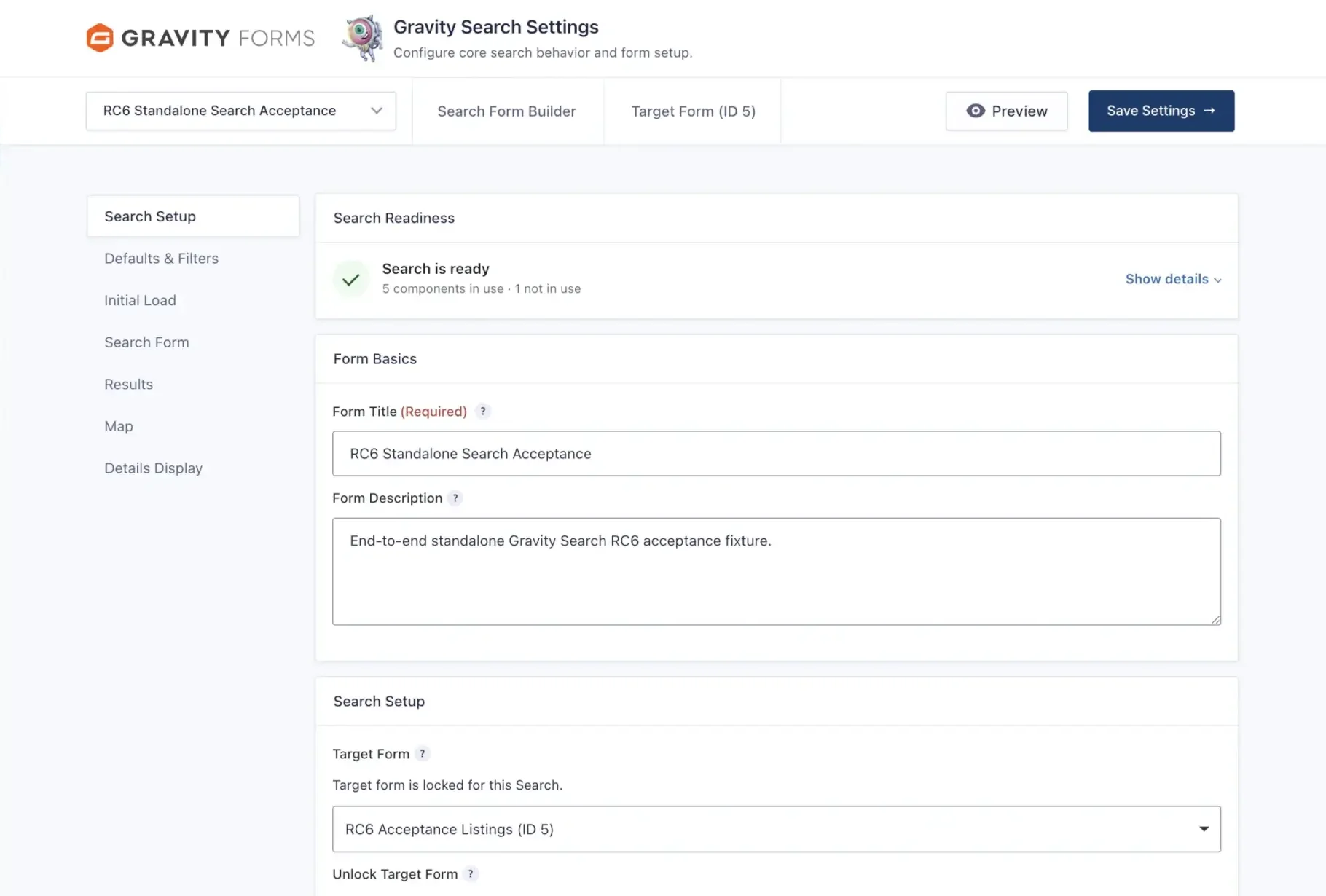
RC6 also introduces clearer sorting and results-per-page controls, better guidance when one feature depends on another, more reliable Search and entry-details URLs, and improved handling of filters and access rules.
Optional features, including location sources, maps, proximity search, and entry-details pages, remain optional and no longer make a valid Search appear incomplete simply because they are not being used.
Gravity Search navigation is also easier to find, with dedicated Searches and New Search links alongside the regular Forms and New Form menu items in Gravity Forms.
Clearer Plugin Packages
Gravity Geolocation RC6 also prepares four clearly named plugin packages:
- Gravity Geolocation - Starter
- Gravity Geolocation - Pro
- Gravity Search
- Gravity Geolocation - All Access
The WPGeo Dashboard uses the package connected to your license, so you can see and install the appropriate build without having to identify it by filename.
Customers with an eligible All Access license can test Gravity Search through the All Access RC6 package. The standalone Gravity Search package is being prepared for its upcoming public release and is not yet offered as a separate purchase.
Other Release Candidates
The other three release candidates continue testing their larger plugin rebuilds:
- Formidable Geolocation 3.0.0-rc4 continues testing its rebuilt geolocation fields, maps, distance and directions tools, address validation, and migration from version 2.3.1.
- Ninja Geolocation 3.5.0-rc4 continues testing its rebuilt geolocation features, dashboard integration, licensing, and update experience.
- WP Job Manager Geolocation 3.0.0-rc4 continues testing its rebuilt job-location features, dashboard integration, licensing, and update experience. It also adds an improved importer that can geocode jobs and resumes that have addresses but no saved coordinates, helping restore them to maps and proximity search results.
What to Test
Please test release candidates on a staging or development website rather than a live production website.
Before installing a release candidate, create a complete backup of your website files and database.
After installation, confirm that your existing settings, licenses, and location data remain available. Test the forms, searches, maps, listings, and other features your website uses.
When reporting unexpected behavior, please include the plugin name, the version you previously used, the installed release-candidate version, and any relevant system details.
What Comes Next
We are now concentrating on real-world compatibility, installation and upgrade behavior, the WPGeo Dashboard, Gravity Search, and any issues customers find while using these release candidates.
If you test one of these releases, please send any problems, confusing behavior, or compatibility findings through our support page.
Thank you for helping us prepare the next stable releases of our geolocation plugins.