
Gravity Geolocation - Location

Collect addresses, coordinates, and current locations with autocomplete and interactive maps in Gravity Forms.

Collect addresses and locations with Gravity Forms

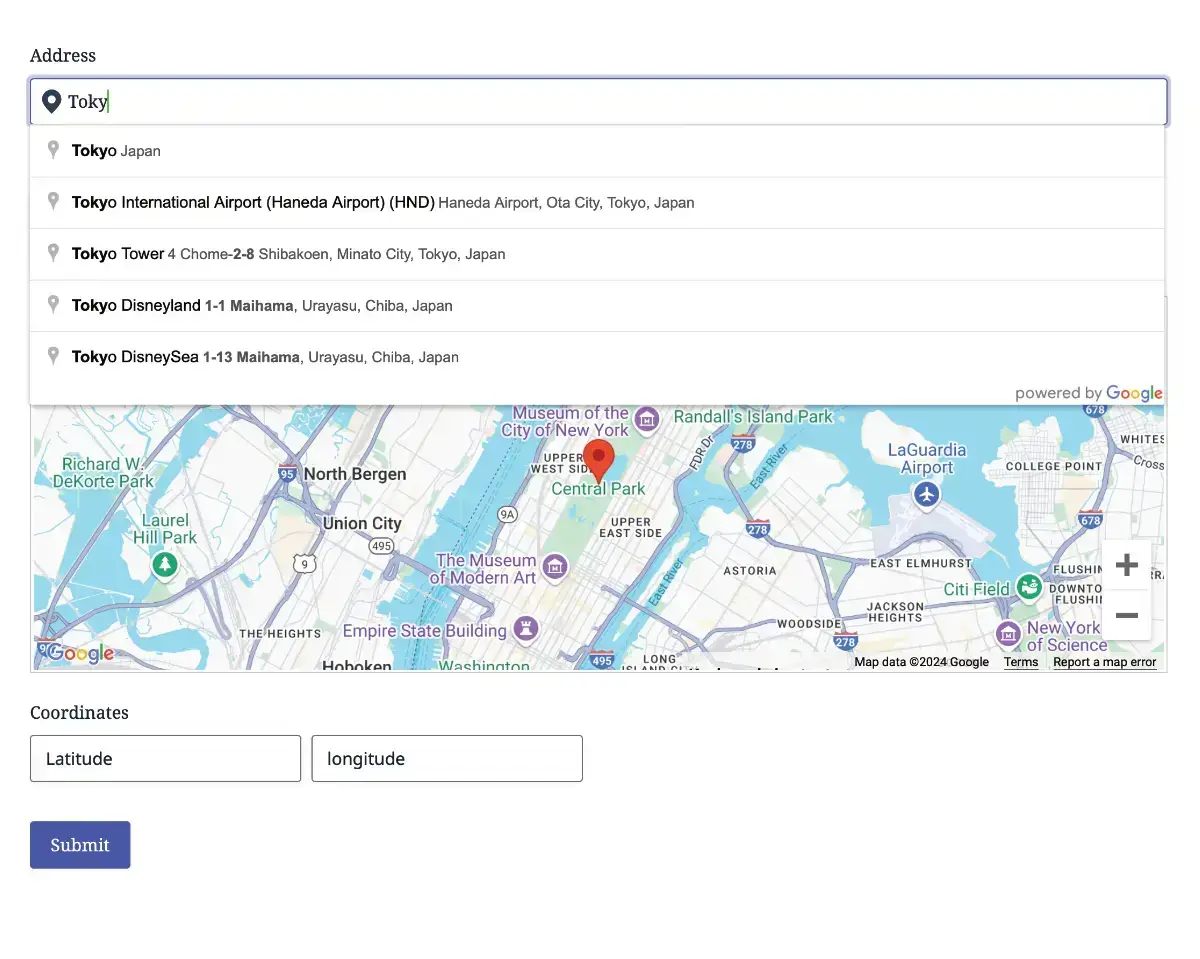
Gravity Geolocation — Location adds address autocomplete, geocoding, interactive maps, and current-location tools to Gravity Forms. Let visitors select an address, choose a location on a map, or share their current position, then save the location information with their entry.

Included features

  • Address autocomplete: help visitors find and select addresses using Google Places suggestions.
  • Geocoding: collect coordinates and available structured address components.
  • Interactive maps: display and select locations directly inside your forms.
  • Coordinates fields: collect latitude and longitude values.
  • Locator Button: let visitors request their current location.
  • Reset Location: let visitors clear their selected location.
  • Dynamic Location Data: use collected location values in your form workflows.

Need more geolocation tools?

Choose Gravity Geolocation Toolkit for everything in Location plus distance and duration calculations, directions, address validation, drawing tools, nearest-location searches, and standalone entry maps.

Only need routing and travel calculations? Gravity Geolocation — Directions is available as a separate focused edition.

Requirements

  • Gravity Forms must be purchased separately, installed, and activated.
  • Google-powered features require your own Google Maps Platform API keys and the relevant services enabled.
  • Google Maps Platform usage is subject to Google's pricing and billing requirements. Google service charges are not included in your plugin license.

License options

Choose an annual license for 1, 3, or 20 sites. Every option includes the same Location features; only the number of permitted site activations differs.

Choosing and upgrading your edition

Location, Directions, and Toolkit are alternative editions of the same Gravity Geolocation plugin—not extensions to activate together. Toolkit combines both focused editions and adds the advanced geolocation tools.

After upgrading your license to another edition, download and install the upgraded package over your existing Gravity Geolocation installation.

Gravity Search is a separate plugin. It can run alongside your geolocation edition but is not included with Location, Directions, or Toolkit.

Get This Plugin

For pricing details and to purchase, visit the plugin’s official pricing page.

View Pricing & Purchase
Changelog

Version 3.6.8 — October 17, 2026

  • Improved: Made Open Settings the first, primary action in the product dashboard header, with demo and dashboard links kept secondary.
  • Improved: Aligned Learn More buttons at the bottom of related-plugin cards.
  • Improved: Moved WordPress admin notices below the product navigation to keep the header and menu together.
  • Maintenance: Reorganized the product dashboard code without changing saved settings, licensing, available fields or automatic update behavior.

3.6.6 - October 16, 2026

  • Compatibility: Improve startup compatibility with Elementor and other third-party plugins.
  • Improvement: Update the embedded Connect and Licensing SDKs to version 0.1.2, using independent loaders without modifying other plugins\' autoloaders.
  • Licensing: Preserve existing license keys, settings, license activation, and automatic updates.

3.6.5 — October 16, 2026

  • Fixed a critical PHP error affecting sites running Elementor and other plugins with private autoload callbacks.
  • Updated Connect and Licensing SDKs to 0.1.1, improving compatibility when older embedded SDKs load first.
  • Preserved existing license keys, settings, and native EDD automatic updates.

3.6.4 - October 16, 2026

  • Updated account dashboard and licensing integration to use independent Connect and Licensing SDKs.
  • Fixed duplicate dashboard pages and menus when multiple embedded runtimes are present.
  • Renamed standalone installation folders to gravity-geolocation-location, gravity-geolocation-directions and gravity-geolocation-toolkit.
  • Updated WPGeo Framework to 1.0.0-rc17 while preserving product identities, license keys, shared settings and native EDD updates.

3.6.3 – October 15, 2026

  • Improvement: Added distinct dashboard catalog identities for Location, Directions, and Toolkit, enabling dashboard installation and connected-account license activation while preserving native EDD updates.
  • Safety: Prevented dashboard activation of another Gravity Geolocation edition while an edition is running. Deactivate the current edition before switching.
  • Improvement: Added product-family filtering, configurable product-card titles, and support for external HTTPS images and Learn More links in the shared dashboard.
  • Updated: Required and bundled WPGeo Framework 1.0.0-rc16.

3.6.2 - October 15, 2026

  • Licensing: Separate license keys and runtime status for standalone Location, Directions, and Toolkit editions while preserving legacy licensing and shared settings.
  • Packaging: Add dedicated installation folders for standalone editions. Only one Gravity Geolocation edition should be active at a time.
  • Fix: Reduce extra spacing in the settings license notice.
  • Maintenance: Update the bundled WPGeo Framework to 1.0.0-rc.15, with product-specific license verification timers and messages.

3.6.1 — October 14, 2026

  • Restored the native CSS Class and Visibility settings for Geocoder fields without changing saved values.
  • Added a License & Updates dashboard tab while retaining license management in Settings.
  • Updated “Activate now” notices to open the license tab directly.
  • Restored and refined the product overview, feature comparison, help, and related-plugin pages.
  • Refreshed translation catalogs while preserving matching existing translations.

3.6.0 — October 11, 2026

  • Introduced the dedicated Gravity Geolocation — Location download with its own licensing and updates.
  • Includes address autocomplete, geocoding, interactive form maps, Coordinates, Locator Button, Reset Location, and Dynamic Location Data fields.
  • Available with annual licenses for 1, 3, or 20 sites.
  • Supports running alongside the standalone Gravity Search plugin.