
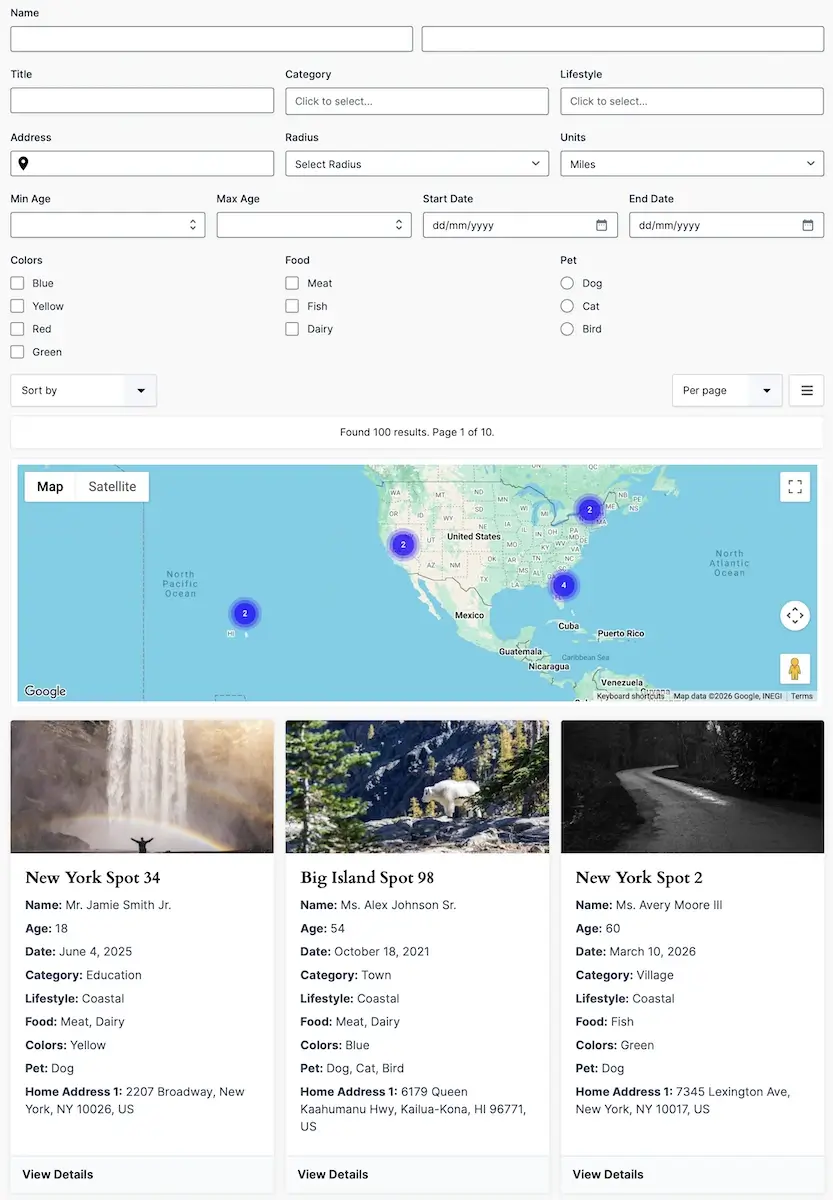
Turn Gravity Forms Entries into Searchable Directories
Gravity Search brings frontend search, listings, proximity filters, interactive maps, and individual entry pages to Gravity Forms. Use the entries you already collect to create a business directory, store locator, property listing, member directory, or searchable resource catalog.
Build visitor-facing search controls with familiar Gravity Forms fields, choose which entries can appear, and customize how matching results are displayed. You can also create a directory that loads automatically without requiring visitors to complete a search form.
Gravity Search is a separate plugin. It works with Gravity Forms on its own, or alongside Gravity Geolocation when your project also needs advanced location-collection fields.
Build Searches Around Your Gravity Forms Data
Dedicated Search Settings and Search Form Builder
- Create Multiple Searches – Configure separate directories and search experiences for different projects or audiences.
- Select a Target Form – Choose the Gravity Form whose entries each Search will query. Each Search uses one Target Form.
- Familiar Field Builder – Build optional visitor-facing search controls using supported Gravity Forms fields and map them to the data you want to search.
- Search Readiness Guidance – Review configuration summaries and setup guidance before placing a Search on your site.
- Automatic Initial Results – Show a predefined directory on page load, with or without visitor-facing search controls.
Flexible Filters and Result Selection
- Entry Field Filters – Let visitors narrow results using supported text, choice, number, and date fields.
- Predefined Filters – Apply fixed entry-field and entry-meta constraints independently of visitor input.
- Match All or Match Any – Control whether supplied mapped field filters must all match or whether any can match.
- Creator Constraints – Configure creator-based restrictions for directories and user-specific entry listings.
- Automatic Search Submission – Update results when search controls change, or use a traditional submit button.
Location and Proximity Search
- Address-Based Search – Let visitors search near an address, with Google-powered autocomplete when configured.
- Current-Location Search – Use browser location detection as a starting point for nearby results, subject to the visitor's permission.
- Radius Filtering – Find indexed locations within a selected distance, with miles or kilometers.
- Distance Display and Sorting – Show distance information and order location-based results by proximity.
- Location-Source Selection – Choose the supported Target Form fields whose stored locations a Search should use.
Customizable Listings, Maps, and Result Controls
- List and Grid Layouts – Choose a results presentation that suits your directory.
- Configurable Result Content – Select the entry information shown in each result and customize output with templates and merge tags.
- Sorting Options – Configure default ordering and the sorting choices available to visitors.
- Pagination and Load More – Control page size and choose standard pagination or a Load More button.
- Interactive Result Maps – Display matching indexed locations on Google Maps with configurable markers and information windows.
- Flexible Placement – Use a complete Search shortcode or place search controls, results, and the map in separate areas of a page.
Individual Entry Details
- Dedicated Details Pages – Link results to a configured frontend page for viewing an individual entry.
- Structured Field Output – Choose which entry fields appear and how their information is presented.
- Custom HTML or Page Content – Build more tailored details layouts using supported entry output and merge tags.
- Readable Details URLs – Configure the Search's entry-details routing beneath its selected Details Page.
Use Existing Entries and Location Data
Gravity Search includes entry-location indexing and import tools for supported location sources. Configure Entry Geocoding for eligible fields, import historical locations, and use indexed entry data for proximity filtering and maps.
When entries contain locations saved by Gravity Geolocation's supported geolocation fields, Gravity Search can use that stored data. It does not need to include the Toolkit's field implementations to search those locations.
Location features are optional. A searchable directory can work without an address field, proximity controls, or a map.
From Form Entries to a Frontend Directory
- Collect your data with a normal Gravity Form.
- Create a Search and select its Target Form.
- Choose filters and optional location sources for the entries you want visitors to find.
- Configure results, maps, and optional details pages to match your project.
- Place the Search on a page using its shortcode and preview the result.
Popular Use Cases
- Business and Service Directories – Help visitors find businesses or providers by entry data and location.
- Store and Office Locators – Display nearby branches, pickup points, or other indexed locations.
- Property Listings – Combine field filters, location search, maps, and individual listing pages.
- Member Directories – Present selected member information stored in Gravity Forms entries.
- User-Specific Entry Listings – Use configured creator constraints to narrow the entries shown to a particular audience.
- Resource and Event Catalogs – Publish searchable entry collections with or without location features.
Works Independently or Alongside Gravity Geolocation
Gravity Search provides the Search builder, entry indexing, frontend results, Search maps, and entry details. Gravity Geolocation provides location-collection and advanced geolocation tools for your normal Gravity Forms.
You do not need Gravity Geolocation for a standard Gravity Search directory. Install both when your project needs connected address, coordinate, map, or other geolocation fields as well as frontend search. Google API keys and location defaults are shared when both plugins are installed; their licenses remain separate.
Gravity Search does not include Gravity Geolocation's Toolkit fields, routing tools, address validation, standalone Single Entry Maps, or Mashup Maps. Its maps are part of the Search results experience.
Plans and Licensing
All Gravity Search plans include the same Search functionality. Choose a license for 1, 3, or 20 sites, depending on how many websites will use the plugin. Licenses renew annually and provide updates and support during the active license period.
Requirements and Google Maps API Setup
- Gravity Forms must be installed and activated. Gravity Search is an add-on, not a replacement form builder.
- Google API configuration is required for Google-powered maps, address autocomplete, and address geocoding. The services needed depend on the features you enable.
- Browser and Server API keys should be configured and restricted for their respective uses.
- Google service usage and billing are separate from the Gravity Search license.
Enable Maps JavaScript API for interactive maps, the applicable Places API for address autocomplete, and Geocoding API for Google-powered address-to-coordinate lookup. Plain entry listings and field-based filters do not require location features.
Learn More
Frequently Asked Questions
Do I need Gravity Geolocation to use Gravity Search?
No. Gravity Search works as a separate plugin with Gravity Forms. Gravity Geolocation is optional and adds location-collection and advanced geolocation tools to your forms.
Can I build a directory without a map or proximity search?
Yes. Use entry-field filters, predefined constraints, result layouts, sorting, and pagination without enabling location features.
Does every directory need a visitor-facing search form?
No. Enable Initial Load to show results automatically. You can create a directory with optional filters or omit the search controls entirely.
Can I use existing entries and geolocation data?
Yes. Gravity Search queries entries from its selected Target Form and includes indexing and import tools for supported location sources, including supported locations saved by Gravity Geolocation fields. Review the location-source configuration and import or index historical entries as needed.
Which entries and fields will visitors see?
Configure the Target Form, fixed filters, creator constraints, and output fields for each Search. These rules govern that Search's output; they do not change how other plugins or pages expose entries. Review your directory's content and access requirements before making it public.
Can one Search combine entries from multiple forms?
Each Search queries one Target Form. Create separate Searches when you need to display entries from different forms.
Are features different between the site-license plans?
No. The 1-, 3-, and 20-site plans include the same Gravity Search features. The difference is the number of websites on which the license can be activated.
Does Gravity Search include Gravity Forms or Google service fees?
No. Gravity Forms is purchased separately. Google-powered features use your own Google API configuration, and Google usage charges are billed separately.