
WP Job Manager Geolocation

Integration between Geo Location and WP Job Manager plugin

WP Job Manager Geolocation Features

Supercharge WP Job Manager with Advanced Geolocation Features

Unlock powerful location-based functionality for WP Job Manager with WP Job Manager Geolocation. Whether you’re building job boards, resume directories, or location-aware listings, this plugin adds precise geolocation tools that enhance search, maps, and user experience.

Powerful Geolocation Features for Job Listings & Resumes

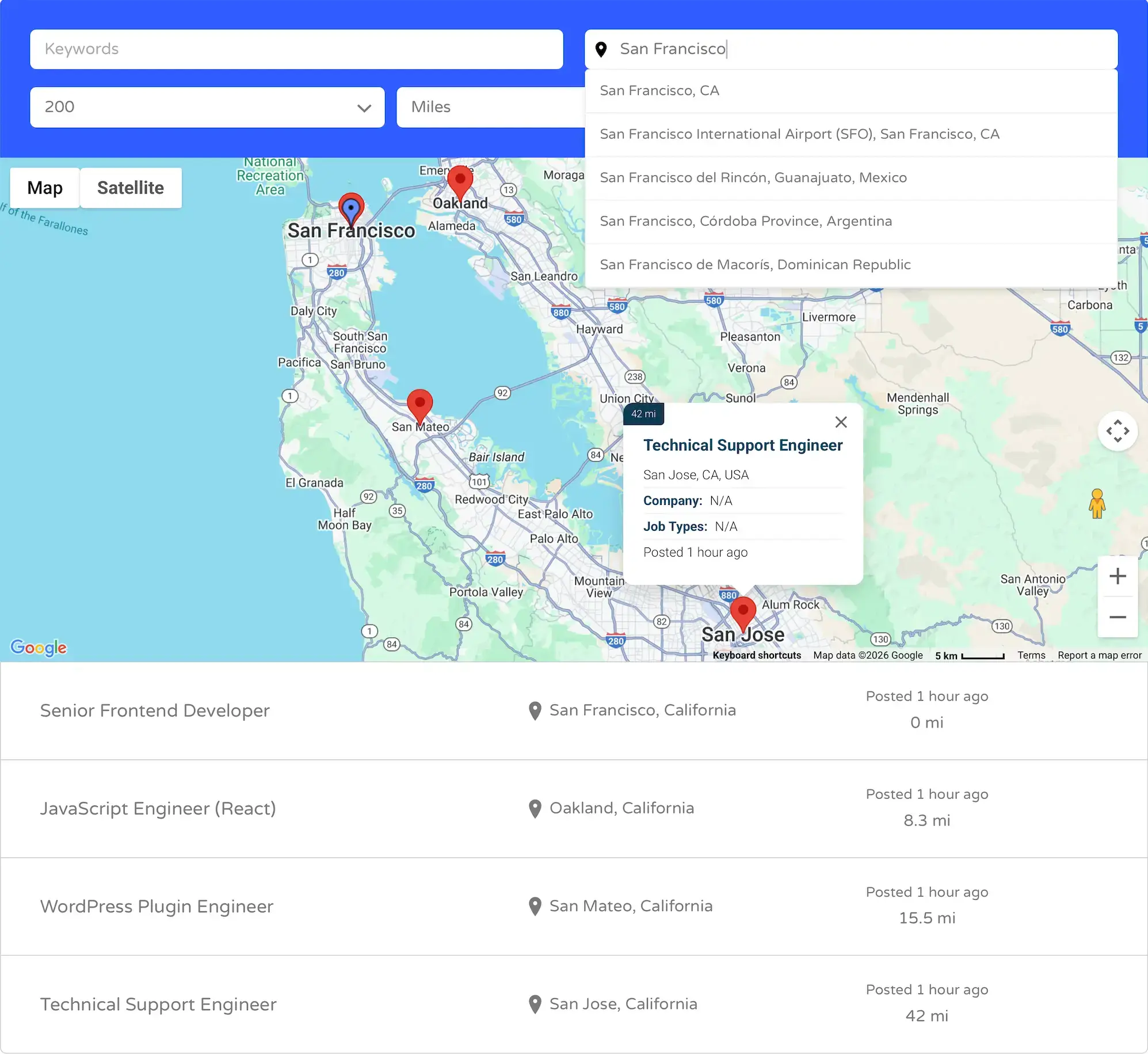
WP Job Manager Geolocation extends WP Job Manager with a robust set of geolocation capabilities, making it easy to add proximity search, interactive maps, and distance-based filtering to jobs and resumes.

  • Address Autocomplete – Speed up searches with accurate, real-time address suggestions.
  • Proximity Search – Let users find jobs or resumes within a specific radius.
  • Distance Display – Show how far each result is from the searched location.
  • Interactive Maps – Display job and resume locations on dynamic Google Maps.

With flexible configuration options, you can control geolocation behavior globally or per shortcode, allowing different location workflows across your site.

Key Features

  • Seamless WP Job Manager Integration – Works natively with Jobs, Resumes, and Alerts.
  • Single Entry Maps – Display a dedicated map for individual job or resume listings.
  • Mashup Maps – Showcase multiple jobs or resumes on a centralized interactive map.
  • Flexible Search Modes – Control geolocation via global settings or shortcode attributes.
  • Smart Asset Loading – Load maps and scripts only when geolocation is in use.
  • Backward Compatibility – Legacy attributes and setups continue to work.

Use Cases

WP Job Manager Geolocation is ideal for a wide range of location-driven websites:

  • Job Boards – Help users find nearby jobs quickly and accurately.
  • Resume Directories – Search and display candidates by location.
  • Recruitment Platforms – Match employers and candidates based on proximity.
  • Local & Regional Listings – Build location-focused employment marketplaces.

Learn More About WP Job Manager Geolocation

For full documentation, setup guides, and pricing details, visit the official WP Job Manager Geolocation website.

Frequently Asked Questions

What does WP Job Manager Geolocation do?

It adds geolocation features to WP Job Manager, including proximity search, maps, distance filtering, and location-based results for jobs and resumes.

Do I need a Google Maps API key?

Yes. A Google Maps Browser API key is required for maps, address autocomplete, and other advanced geolocation features.

Can I display multiple jobs or resumes on a single map?

Yes. The Mashup Map feature lets you display multiple job or resume listings together on one interactive map.

Does it work with both jobs and resumes?

Absolutely. The plugin supports job listings, resume listings, and related WP Job Manager extensions.

Is WP Job Manager Geolocation compatible with existing setups?

Yes. Version 3.0 maintains backward compatibility while introducing a cleaner, more consistent geolocation system.

Get This Plugin

For pricing details and to purchase, visit the plugin’s official pricing page.

View Pricing & Purchase
Changelog
  • Version 2.3.3 - 1/27/2026
    • Fix: autocomplete country restriction to support multiple countries.
    • Tweak: change alert distance input type from text to number.
    • Tweak: import job locations when importing jobs using the Go Fetch plugin.
    • Tweak: modify search form filters using a new action hook to support additional themes.
    • Tweak: temporarily disable internal storage handling of WP Job Manager to prevent conflicts.
    • Cleanup: general code cleanup and internal refactoring.
    • New: add admin notifications regarding the new version of the plugin.
  • Version 2.3.2 - 1/4/2021
    • Fix: the map is not loading for the Resume Manager Geolocation plugin.
  • Version 2.3.1 - 12/29/2020
    • Fix: issue with the map and last used values of the geolocation search form filters are not loaded when refreshing the page or when using the browser\'s \"back\" button.
    • Fix: conflict with Elementor plugin in the back end. Verify that \'GJM_Maps\' class exists before trying to execute it.
    • Fix: target the first submit button specifically when detaching it in the form.
    • Fix: jQuery Chosen issue in \"preset pages\" setting in the admin. Use select2 instead of Chosen.
    • Tweak: update geolocation filters CSS styling for Jobify theme.
    • Tweak: allow displaying map when no locations were found.
    • Filter: \'gjm_hero_search_enabled_pages_id\' to enable the Hero geolocation feature on specific pages only.
    • Tweak: make locator button title attribute translatable.
  • Version 2.3 - 3/27/2020
    • Fix: Ignore the user\'s current location on page load when an address already exists in the address field of the job search form.
    • Fix: Issue with the zoom level of the single page map.
    • New: Google Maps Server API key testing tool added to the General tab of the Settings page.
    • Tweak: modify the Google Maps API key setting field description.
    • Tweak: Enable custom fields in the Edit Job/Resume pages when the ACF plugin is activated to better know if an address was geocoded or not.
    • Tweak: in the Plugins page, hide the license key input box by default when the license key is activated.
    • Enchantment: display a message that indicates if the address was successfully geocoded or not below the address field of the Edit Job/Resume Page of the admin\'s dashboard.
  • Version 2.2.3 - 8/4/2019
    • Fix: place the geolocation filters above the new submit button that was introduced in a recent version of WP Job Manager plugin
  • Version 2.2.2 - 6/7/2019
    • Fix: location search stop working when updating to WP Job Manager 1.33.0.
    • Minor changes and bugs fix.
  • Version 2.2.1 - 4/2/2019
    • Fix: issue with categories not being selected due to the move from jquery chosen to select2.
    • Fix: javascript function name typo.
    • New: save the location from the auto-locator in cookies for one day instead of getting the location on every page load.
    • New: function to get, set, and delete cookies via javascript.
    • Tweak: allow deactivation of the plugin while license is activated.
    • Tweak: increase transient expiration duration.
    • Tweak: update license class. Add documentation and Settings links to the Plugins page.
    • Additional minor bugs fix and tweaks.
    • WPCS
  • Version 2.2.0.1 - 12/14/2018
    • Fix: some of the plugin\'s files don\'t load properly.
  • Version 2.2 - 12/13/2018
    • Fix: verify that a location is returned from the geocoder to prevent error messages.
    • Fix: verify that $this->locations_data exists to prevent error messages.
    • Fix: verify that $this->filters[\'radius\'] exists to prevent error messages.
    • Fix: orderby filter doesn\'t work properly.
    • Fix: make sure that the Hero settings of the Jobify theme apply only to the “flat” form of the home page.
    • Compatibility: now compatible with the Listing Easy theme.
    • Tweak: locations importer can now be called from the front-end and back-end using the function gmw_import_locations();
    • Tweak: update some values in gjm_query_cache.
    • Tweak: append jobs and resumes form with \'gjm-features-enabled\' class to easier control the form and geolocation features.
    • Tweak: modify the Jobify Hero page to work with other themes as well.
    • Tweak: show distance in Listify theme search results.
    • Style: update general styling and styling related to different themes.
    • various bugs fix.
    • WordPress coding standards.
  • Version 2.1.1 - 10/2/18
    • Fix: issue with boundaries search when geocoding provides a state value when not needed.
    • Fix: distance element shows even when the distance is not provided in the results.
    • Fix: PHP warnings.
    • Update: try geocoding via HTTP when an address is provided but coordinates are missing. This mostly happens on page load when an address is provided via URL but not the coordinates.
    • Update GEO my WP delete function.
  • Version 2.1 - 8/15/2018
    • Compatible with GEO my WP 3.1.
    • New: new static function GJM_Admin::import_locations() to import locations. It can now be used directly.
    • Fix: load gjm-functions.php file in the back-end as well to be able to use its functions.
    • Fix: hide filled jobs by default from Jobs global map. It can be enabled using the shortcode attribute show_filled_jobs.
    • Fix: styling for WorkScout theme.
    • Fix: geolocation filters issue with Petsitter and Babysitter themes.
    • Fix: some cases where results will show based on previous address entered.
    • Fix: set min-width to info-window and styling for Wordscout theme.
    • Fix: verify that the autocomplete field exist before tempting to enable the autocomplete to prevent errors.
    • Fix: map won\'t trigger on some themes with a custom class name for the job_listing container.
    • Fix: modify hook to display the distance in the WorkScout search results.
    • Fix: gjmObject undefined in some themes.
    • Enhancement: modify the way location being queried. Modify the clauses of the main WP_Query directly using a filter, instead of getting the location data and passing it to the “include” variable of the WP_Query.
    • Enhancement: new global function gjm_update_location() to update job location. The function also updates location in the new database table of GEO my WP 3.x. instead of adding with MYSQL directly.
    • Tweak: change gjmAddressAutocompleteFields variable to gjmAddressAutocompleteOptions which contains additional values.
    • Tweak: remove gjmOptions variable. API values now pass via data attributes.
    • Tweak: use a different hook to update location after imported from WP All Import plugin.
    • Tweak: Don\'t load markers clustered library if WorkScout theme already loads it.
    • Tweak: Add region and language API settings via data attribute instead of using localized gjmObject.
    • Filter: new filter ‘gjm_default_radius_value’ to modify the default radius value in the drop-down.
    • Filter: \'gjm_query_posts_without_location\' to enable / disable query of posts without location.
    • various bugs fix.
  • Version 2.0.1 - 3/20/2018
    • Fix: units filter will not filter results properly.
    • Fix: errors caused by code which was not properly commented out.
    • Update front-end stylesheet.
    • Improve address geocoding JS functions.
  • Version 2.0 - 12/01/2017
    • This is a major update.
    • Improve performance, bugs fix and new features.
    • Integration with Job Alerts. Setup alerts based on location and distance.
    • Better integration with Indeed Jobs. Jobs from indeed will now display on the map.
    • Better integration with different themes.
    • Better integration with Jobify theme. New settings to enable the geolocation features on the Hero search of the home page.
  • Version 1.8.2.1 - 3/13/2017
    • Fix: duplicate preset pages option in settings page when Resume Geolocation extension is enabled.
    • Fix: job type slug shows instead of name in marker info-window.
    • Update: Language files
  • Version 1.8.2 - 3/9/2017
    • Fix: enqueue JS files only in pages where geolocation is enabled for Jobs forms.
    • Fix: issue with search fires twice on jobs form.
    • Fix: enable geolocation features only on forms with gjm_use enabled.
    • Fix: license activation/deactivation doesn\'t work ( plugins page scrolls up instead ).
    • Fix: modify the location of gjm_labels() function to allow to use its filter.
    • Update: modify link to Google Maps API key tutorial in settings page.
    • New: enable geolocation features on preset pages.
    • New: set initial zoom level for the single job map.
    • New: maximum zoom level settings for jobs map and single job map.
  • Version 1.8.1.1 - 12/19/2016
    • Fix: prevent fatal error message when geocoding failed.
  • Version 1.8.1 - 12/18/2016
    • Fix: register styles and scripts properly when Listable theme activated
    • Tweak: add styling for Listable theme
    • Tweak: Add distance to search results of Listable theme.
    • Fix: issue with map size not working when setup in settings page.
  • Version 1.8.0.1 - 11/06/2016
    • Fix: Address autocomplete does not work in admin\'s Edit Job page.
    • Update language files.
  • Version 1.8 - 8/24/2016
    • Tweak: Make compatible with WorkScout theme. Geolocation feature should now work with [jobs] and [resumes] shortcodes.
    • Fix: Marker Clusters issues. Prevent Marker Clusters from disappearing when in lowest zoom level.
    • Tweak: Spread markers that are at the same exact location. Slightly move markers that are at the same exact location to be able to click on.
  • Version 1.7.7 - 6/30/2016
    • Note that since June 22nd 2016 Google requires an API key in order to use its Google Maps features.
    • Tweak: New input box for Google Maps API added to the Settings page ( GEO General Settings tab ).
    • Tweak: Add Google API key to the Google Maps call.
    • Hook: Add filters to modify the Google API call.
  • Version 1.7.6.7 - 6/18/2016
    • Fix: Jobify theme menu disappears when Job Gelocation add-on activated.
    • Fix: Map in single job page cannot be disabled.
  • Version 1.7.6.6 - 6/14/2016
    • Fix: location of map on single page of Jobify theme.
  • Version 1.7.6.5 - 6/14/2016
    • Fix: styling issue with Jobify theme - change search form filter priority and adjust CSS styleshit.
  • Version 1.7.6.4 - 6/5/2016
    • Fix: JavaScript error when removing clusters.
    • Fix: Force new clusters images path if set to old path.
  • Version 1.7.6.3 - 5/27/2016
    • Fix: issue saving location when company information is missing.
  • Version 1.7.6.2 - 5/12/2016
    • Fix: URL to marker Clusters images
    • Update marker clusters library
  • Version 1.7.6.1 - 5/10/2016
    • Fix: Language files are not loading.
  • Version 1.7.6 - 4/30/2016
    • Fix: Jobify theme styling. Wrong position of submit button.
    • Fix: wrong date showing in map info-window.
    • Update: language files.
  • Version 1.7.5 - 1/9/2016
    • Fix: Conflict with Jobify theme and Applications rating Icons. Prevent GJM stylesheet from loading on applications pages when Jobify theme activated.
    • Fix: remove warning when saving a job. verify the value of all job form\'s fields before trying to save to database to prevent warnings/erros.
    • Tweak: modify font icons structure to prevent conflicts. Change the font icons usage to “gjm-icon-“ instead of “icon-“ and the icons font family to \"wpjm-geolocation\" to prevent conflicts with other themes and plugins.
    • Hook: new filter to modify the default orderby dropdown value. Use the hook apply_filters( \'gjm_default_orderby\', $query_args[\'orderby\'], $this ); to modify the default orderby dropdown selectbox value of jobs search form.
    • Shortcode: Use the shorcocde [gjm_single_job_map] to display the single job map (on a single job page ) anywhere on the page or a text widget.
  • Version 1.7.4.1 - 1/02/2016
    • Fix: No results showing when location fields left blank. ( if you still get no results after the update you should navigate to the admin \"Edit Job\" page of any of your existing jobs and click the \"Update\" button. Doing this will reset the internal cache of WP Job Manager plugin ).
  • Version 1.7.4 - 12/25/2015
    • Fix: Remove unwanted alert message.
    • Tweak: Allow country and state boundaries search. When entering only country or state in the \"Location\" fields the plugin will search for all locations within that country or state instead of doing a proximity search. To enable this feature you need to add the line of code add_filter( \'gjm_search_within_boundaries\', \'__return_true\' ); to the functions.php file of the active theme of your site.
  • Version 1.7.3.1 - 12/17/2015
    • Tweak : add \"types\" option to Google Places address autocomplete ( GEO General Settings tab ).
  • Version 1.7.3 - 12/14/2015
    • Tweak: set orderly to original value set by WP Job Manager plugin if no value chosen from the orderly dropdown.
    • Tweak: use a different filter to fire the address autocomplete on new Job form in front end to prevent issues when disabling company fields.
  • Version 1.7.2.1 - 11/20/2015
    • Fix: added back class tags to form filters to fix issue with JobSeek theme.
  • Version 1.7.2 - 11/14/2015
    • Fix: Prevent multiple maps showing on single job page.
    • Fix: Conflict with Job-Seek page load.
    • Fix: Load the default list of results before the automatic page-load if trying to retrieve the current position.
    • Fix: remove warnings.
    • Tweak: new filter to modify the map arguments before passing to JavaScript.
    • Tweak: added locator icon styling for Job-Seek Theme
    • Feature: add custom clusters support for [jobs] shortcode
    • Feature: Set URL to custom clusters images.
    • Feature: Set custom URL to clusters images and custom markers for global maps.
  • Version 1.7.1 - 11/9/2015
    • Fix: Remove warning / fatal error message.
  • Version 1.7 - 11/8/2015
    • This is a major update of the plugin which includes many bug fixes, new features, improved performance and more.
    • Plugin name, files and folders name were modified.
    • Feature: Auto-locator on page loads - when navigating to a Jobs/Resumes the plugin will first try to detect the visitor\'s current position and if found it will dynamically submit the form with the visitor\'s address.
    • Feature: Map markers grouping - you can now choose to group nearby map markers using Markers Clusterer, Markers Spiderfier or choose not to group at all.
    • Feature: Set URL to custom map markers.
    • Feature: The locator button is now a \"location\" icon within the address field instead of a regular button.
  • Version 1.6.2.5 - 5/6/2015
    • Fix: fatal error.
  • Version 1.6.2.4 - 5/6/2015
    • Fix: CSS for Jobify theme.
    • Fix: use version_compare function to compare plugin versions.
    • Code cleanup
    • Fix: google maps API doesn\'t load when GEO my WP plugin activate.
  • Version 1.6.2.3 - 4/10/2015
    • Fix: info-window content filter set incorrectly.
    • Fix: Global Map showing incorrect post date. Added global $post into the loop.
    • Fix: Conflict between the licensing system of GEO Job Manager and WP Job Manager plugins. Added a submit button click check.
  • Version 1.6.2.2 - 3/21/2015
    • Fix: Address Autocomplete doesn\'t work on Job form in front/back end
    • Fix: Update clauses queries to better work with resumes orderby date
  • Version 1.6.2.1 - 3/17/2015
    • Fix: Fatal Error cause by PHP version incompatibility
  • Version 1.6.2 - 3/17/2015
    • Compatible with WP Job Manager 1.21.3 and up. It will not work properly with lower versions.
    • Updated to work with the cache system on the latest version of WP Job Manager
    • New columns \'street_name\' and \'street_number\' added to the custom table of the pugin to better fit the new version of WP Job Manager.
    • Core improvment.
    • Language files updated
  • Version 1.6.1 - 2/21/2015
    • Update Jobify theme styling
    • Update styling to be compatible with Listify theme
    • Remove warnings
  • Version 1.6.0 - 2/17/2015
    • Compatible with WordPress 4.1
    • Compatible with WP Job Manager 1.20.1
    • New: Import location to GEO Job Manager when importing using WP ALL Import plugin.
    • Update : translation text
    • New language: Russian - Thanks to Pavel Kuznetsov
    • New: Add scrollwheel option to Mashup maps
    • Fix: Various bugs fix
  • Version 1.5.1 - 11/15/2014
    • Fix: JavaScript conflict with GEO my WP 2.5
    • Tweak: [gjm_results_map] - new shortcode that displays the search results map amywhere on the page rather than below the search form
    • Various bug fix
  • Version 1.5 - 9/15/2014
    • Update: plugin\'s updater class updated for better performance.
    • Removed: GMW add-ons page was removed
    • Update: License key class improved and now the license key input field can be found in the dashboard plugins page
    • Update: Minified JavaScript files for better performance
    • Fix: Marker clusterer issue where two locations on the same exact spot wont show.
    • Fix: Conflict with GEO my WP JavaScript files and Google API,
    • Tweak: Added input box for region to be used as the default region of Google API.
    • Fix: Issue where county_long field wont be saved when updating location.
    • Fix: Removed duplicated location input field.
    • Fix: Missing post_content in posts loop.
    • Fix: class typos.
    • Fix: missing translated text.
    • Tweak: Locations importer added. The importer can be used to import jobs and resumes location entered previously the installation of GEO Job Manager and Resume Manager Geolocation plugins.
    • Update: Improved map markers info-window. Additional information added to its content:
    • Tweak: New filter allows to modify the content of the info-window.
    • Tweak: New filter allows to modify the map markers.
    • Tweak: New map button ( within the map ) to toggle between full screen size map and normal size map
  • Version 1.4 - 6/14/14
    • Make Gobal map avalible for Resume Manager Geo-location add-on
    • Fix: make sure that updater file was not already included to prevent conflict with other plugins.
    • Fix: Enqueue google-map js earlier
    • Fix: settings tab title
    • Fix: make sure global map being generated only one on a page to prevent conflicts.
    • Fix: Query clauses filters. To be able to modify it if needed
    • Fix: CLASS tags
    • Fix: added prefix to posts table name in Global map clauses which prevent the map from displaying on sub-sites
  • Version 1.3 - 5/29/14
    • New: [gjm_jobs_map] shortcode displays all job on the map.
    • Improved: Automatic updates system.
    • Fix: \"Sort by\" default value is now the default value of set for Wp Job Manager plugin.
    • Fix: Sort by \"feature\" was not displaying correctly. Now when choosing to sort by \"Feature\" feature jobs will show on top and the rest will be ordered by the distance.
    • Fix: issue with \"anywhere\" jobs were not displaying when not searching by location.
    • Fix: delete locaiton from GEO Job Manager database table when no location entered for job.
    • Fix: Geolocating function. GEO Job Manager geolocation function wroks as a backup in case that WP Job Manager geolocating was unsuccessful
  • Version 1.2.2 - 4-27-2014:
    • Fix: Map zoom too far when going from no results to showing results.
    • CSS: Improved styling with latest version of Jobify theme
  • Version 1.2.1 - 4-24-2014:
    • Fix: styling conflict with Auto-location Pro plugin
    • Fix: Last update date conflict with Resume Manager Geolocation plugin
    • Fix: Locator button issue
    • Improve styling on mobile devices
  • Version 1.2:
    • Very Important - You will need to re-save GEO Job Manager settings after this update.
    • Improved autocomplete feature using Google Places.
    • Restrict autocompelte results based on country
    • Set Google API language which controls the results of the autocompelte and the map.
    • Improved styling.
    • Integration with the new add-on Resume Manager Geo-Location
  • Version 1.1.2:
    • Improved styling to work better with Jobify theme
    • Added a check to see if custom table exists in database
    • New feature: Markers clusterer
    • New feature: Map for single job page.
  • Version 1.0:
    • Initial Release